

Grok Bot gives you persistent agents that can work through apps, websites and files, then pass a job to one another. The useful question is whether that division of work leaves you with less coordination to do. A researcher and an editor are helpful only if the editor receives the right evidence, knows which version is current and stops at the boundary you set.
The product launched as a beta on 11 August 2026. At this guide’s 27 October 2026 research check, its public changelog listed v0.75.8, dated 24 October, as the latest release. The current documentation describes a broader product than the original launch announcement. This is a guide to documented behavior, with an original exercise you can try; we have not installed Grok Bot or run that exercise. Launch announcement · Changelog
What you are handing work to
A Bot is a continuing role with its own conversation and retained context. You can name one Researcher, give another responsibility for a particular report, and return to them later. Work can continue in the cloud after you close your laptop. The desktop and phone apps provide access to that work. Overview
That arrangement puts Grok Bot in a different operational category from an answer-only chat. It can change the systems it reaches. A completed response therefore needs to explain both the result and any actions taken along the way. “I drafted the reply” and “I sent the reply” are different outcomes, even when the wording is identical.
The Grok name also does not identify a fixed model behind every task. Cursor’s model documentation says routing can use first-party xAI models or third-party providers. There is no model picker, and the model used for an individual request is not displayed. The page discusses Opus 5.5, but that does not establish that every Bot request runs on it. It also says Cursor team model allowlists do not govern Grok Bot. Model routing
For someone coming from the Hermes guide, this changes what you can inspect. Here, evaluate the result and the handoff without assuming you know the serving model. A change in answer quality cannot, by itself, tell you whether a saved instruction, different inputs or backend routing caused it.
Separate roles on one shared computer
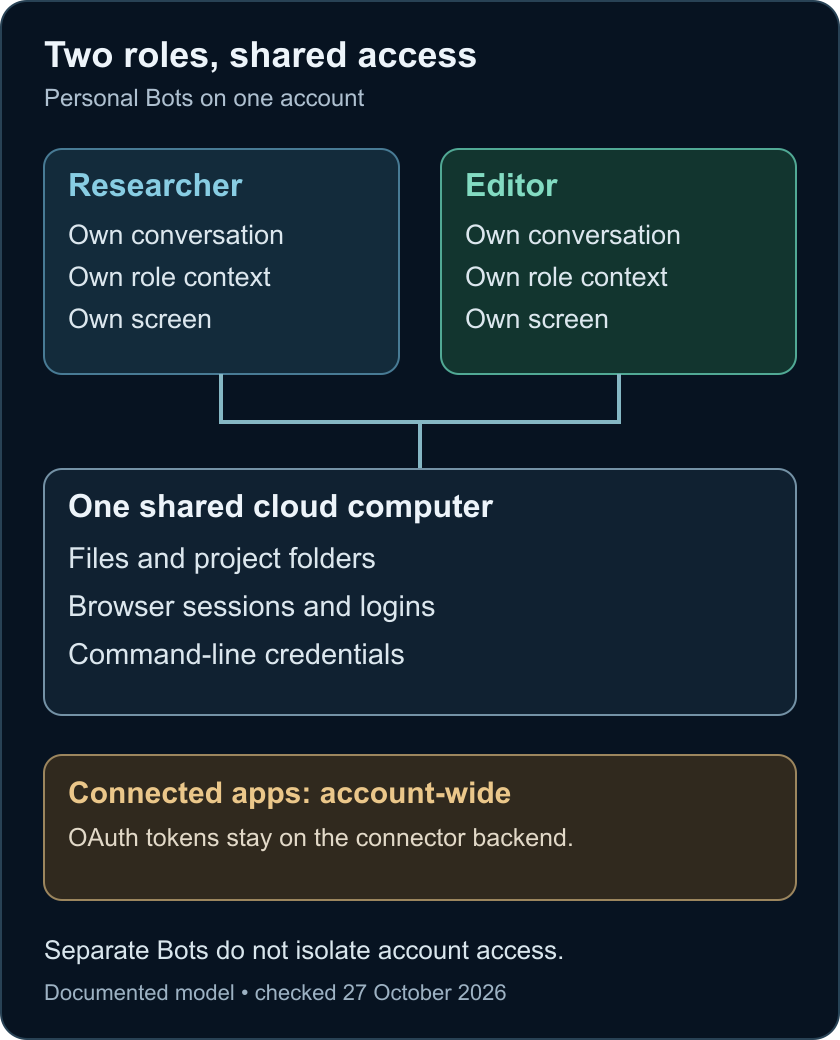
Personal Bots on your account use the same cloud computer. Files, browser sessions and command-line credentials are shared. Each Bot has its own screen for computer use, but the screens do not provide separate access boundaries. Connected apps are also account-wide; their OAuth tokens are held on Cursor’s connector backend rather than handed to the model. Computer and apps
This makes a handoff convenient. One Bot can save evidence and another can work from it without a second upload. It also means that naming one Bot “Finance” and another “Research” does not, on its own, keep the research role away from material available on the shared machine.
Use roles to divide responsibility. Use actual account permissions and access controls to limit what can be reached. A project folder helps organize a task; it does not create a private compartment for one Bot.
The documentation recommends /workspace for durable project files. Browser logins can persist, and cloud work does not depend on the app staying open. Local command execution is a separate capability with its own policy, initially set to ask for each use. Computer and apps · Local execution settings
Check access and usage before the first job
The current documentation supports macOS on Apple silicon and Intel, Windows and Linux on x64 and Arm64, and iPhone, iPad and Android. The official download and setup pages are the starting point. Platform FAQ · Setup
Billing needs a dated explanation because two arrangements coexist.
The X Subscription
Grok Bot is included in Premium, Super and Ultra, but not Plus. Listed monthly prices are $30, $100 and $200, respectively, before sales tax. These are subscription prices, not a price per completed Bot task. Pricing
Bot usage draws from a weekly pool shared with other covered Grok and Cursor usage. Switching an existing account is optional, and the documentation says completed account unification cannot be undone. Confirm which account and subscription you already have before treating migration as a setup step. Grok Bot on The X Subscription
Legacy plans and linked access
Legacy paid Cursor plans, eligible linked SuperGrok or X Premium+ subscriptions, and qualifying Grok Business seats have their own access routes. A Cursor grant and a linked grant do not stack; the larger applicable grant is used. A legacy link is described as permanent, so selecting the right account matters. Plans and billing
Included usage is not an assurance of zero additional charges. Legacy on-demand usage can continue after the weekly grant runs out, and its monthly limit is not a hard stop in the middle of an active run. The newer subscription uses prepaid extra credits and optional top-ups. Inspect the actual billing controls before leaving work unattended. Plans and billing
For the exercise below, use an entitlement you already understand. You do not need to connect work accounts, buy another plan or turn on extra usage merely to prepare the inputs. If access is unavailable, stop at the written exercise rather than changing subscriptions just to complete it.
Start with one Bot and one inspectable result
Install from the official download page, sign in through the route appropriate to your plan and wait for the cloud computer to finish provisioning. The setup guide supports a first task based only on an attached document, without a service login. Give the first Bot a narrow job and a clear deliverable. Get started
An effective first result is something small enough to check completely: a brief from supplied notes, a reconciled list or a draft with source references. Specify which material is authoritative, what the Bot may change and where it should stop.
The Files and results guide describes attachments, generated documents and Pages that can be reviewed and revised. For this first attempt, a Markdown file and the underlying claim list are enough. Ask for the actual files in the conversation, not just a message saying they exist. Files and results
Add a second Bot when there is a distinct review or specialist job. The Bot management guide separates lasting role preferences from one-off tasks. It also distinguishes hiding a Bot from stopping its routines, and a template copy from a shared ongoing Bot. Bot management
How a handoff works
The collaboration documentation supports groups of two to six Bots, explicit mentions and asynchronous messages between Bots. A group makes the exchange visible, but it does not display every kind of interaction: approval requests, login requests and email or Slack drafts are excluded from the group view. Bot-to-group handoff messages are currently text-only. Messaging and collaboration
Make a handoff specific: who owns the next step, which artifact is ready, which revision applies, what remains unresolved and whether the recipient may change anything. A shared conversation can carry that information, but merely adding two Bots to it does not establish those rules.
A request to stop takes priority over background work according to the documentation, but it cannot undo completed actions. When a brief changes, ask for the current state and a revised output, not an assumption that the old work vanished. Messaging and collaboration
Approvals need explicit intent
Auto Review evaluates proposed tool calls and computer actions. With it enabled, a matching Ask first rule takes precedence over an automatic allowance. The documentation describes it as model-based, so it should accompany narrow access and clear instructions. It is not proof that a mistaken action is impossible. Approvals
Recent release notes matter here. The 23 October entry says emails and Slack messages you ask a Bot to send can go out once Auto Review permits them, while routine and other turns still wait as drafts. It also introduces a Vault for stored logins, cards and contact information. Those changes postdate several general guidance pages. Do not read older draft-card examples as a promise that every send will wait for a second click. Release notes
If the desired outcome is a draft, say so. Review the recipient, destination and final content when you later decide to send. Keep account sign-in and credential handling out of the exercise; it does not need them.
Cloud storage is another separate choice. Grok Bot requires stored cloud state and does not support Legacy Privacy Mode. That is distinct from applicable controls over training use. Account and privacy settings
Cursor’s security documentation says the hosted computers currently run in the United States, while its separate US-only residency program does not automatically cover Grok Bot. It describes training protection under Privacy Mode and provider retention terms with abuse-investigation exceptions. Those statements should not be shortened into “nothing is stored” or a blanket data-residency guarantee. Security documentation
Try a changed brief with two Bots
This is original fictional material for a reader exercise. We have not run it. It checks whether you can observe a correct handoff, correction and final review. It does not measure general reliability or prove that multiple Bots outperform one.
Use two personal Bots, named Researcher and Editor, in a group. Keep any established unrelated work out of the task. Record the app version, account-plan type, enabled connections and starting usage. There is no need to grant local command access or connect an external service.
1. Set responsibilities before sending evidence
Give the group this instruction:
We are preparing a private briefing from fictional source cards. Researcher owns the evidence ledger; Editor owns the final brief. Use only material supplied for this exercise. Do not browse, connect apps, send messages outside this Bot group, publish, purchase, schedule work or change existing project files. You may create exercise files under a new /workspace/lumen-practice folder. Do not overwrite that folder if it already exists; ask for a new name. Preserve earlier revisions. If a requested operation is unavailable, report that instead of claiming it succeeded.Then define the review point:
Researcher: prepare a ledger with claim, source card, status and unresolved question. Hand its file path and revision to Editor. Editor: check it against the supplied cards, then write a brief of no more than 180 words. Return both files here and stop for my review. Neither Bot may approve external action for the other.
The folder is an organizational convention, not a sandbox. The exercise deliberately gives the Bots different outputs so you can see who owns each stage.
2. Supply three cards
Lumen Card A — 1 October 2026: The Lumen project plans a private preview on 14 October. Six teams have been invited. This is an invitation count, not a count of active users.
Lumen Card B — 8 October 2026: The preview moves to 21 October. CSV export is planned for the preview, but this note does not confirm that it works or has shipped.
Lumen Card C — 12 October 2026: A contributor proposes a public demo on 28 October. The team has not approved the demo.
Ask the Researcher to begin. Let the Editor finish revision 1 before introducing any correction. Save both outputs. Check the transcript for a real handoff and check the files themselves; two polished messages are not sufficient evidence that the Editor opened the ledger.
Ask the Editor to identify the ledger path and revision it used. Its brief should distinguish an invitation, a scheduled preview and an unapproved proposal. The actual date on your calendar does not turn any of those into a completed event.
3. Change the evidence and the intended audience
Send the group this additional card and instruction:
Lumen Card D — 20 October 2026: The preview is postponed with no replacement date. CSV export remains planned. The proposed public demo is cancelled.
@Researcher update the ledger to revision 2 using Card D and hand it to Editor. @Editor replace the earlier brief with a private decision note for the project lead, no more than 120 words. State what changed, what remains unknown and which earlier claims are superseded. Preserve revision 1. Return revision 2 only after checking the revised ledger. Do not turn this into an announcement or send it anywhere.
Using a group-wide correction gives both Bots the same visible update. It intentionally avoids testing whether an unseen instruction will propagate by magic. The question is whether their actual outputs and handoff use that instruction consistently.
4. Inspect the result before giving either Bot credit
Keep this reviewer key separate until revision 2 is saved:
- The preview has no current replacement date and no confirmed completed launch.
- CSV export remains planned; it is not reported as delivered.
- The public demo is cancelled.
- Six invited teams must not become six active users.
- The final artifact is a private decision note within 120 words, attributed to the supplied cards.
- Revision 1 is preserved, and the Editor identifies revision 2 of the ledger as its input.
Record missing or conflicting evidence. Did the Researcher update the ledger but hand over the old file? Did the Editor quote Card D while leaving the old date in the conclusion? Did both Bots rewrite the same artifact? Did either claim to send or publish something despite the boundary?
These observations are more useful than asking whether the Bots “collaborated well.” They identify what failed: source interpretation, artifact selection, responsibility or instruction following.
5. Save the procedure only after reviewing it
If the result is satisfactory, ask:
Draft a reusable skill for this two-role briefing process. Include ownership, claim attribution, revision checks, correction handling and the final human review point. Exclude Lumen’s names, dates and answers. Show the full instructions before saving. Do not create a routine.
Read the proposed procedure. It should describe how to work with new evidence rather than encode the answer to this exercise. A correct result here could still come from the prompt alone. To investigate repeatability, use a fresh fictional case and record the same observations; do not report one successful attempt as a benchmark.
Memory, skills and recurring work
Personal Bot memory can retain preferences and summaries, but changing facts should still be checked in their source. A remembered role is useful context, not an authoritative record of today’s project status. Bot management
A skill describes a method; a routine assigns recurring execution to a Bot. The private skill library is shared across your Bots, with enablement for the Bot that uses it. Teaching by demonstration, when available, produces a draft skill to review. The documentation also warns that a routine’s Test performs real work rather than simulating it. Skills and routines
Before scheduling the briefing process, decide its input source, owner, timezone, output destination and behavior when evidence is missing. For example, a missing source should produce an explicit failure, not yesterday’s brief with a new date. First inspect a single run; then decide whether repetition is worth the usage and attention it consumes.
On mobile you can inspect routine status and run history and pause or resume it. The current mobile guide reserves routine editing and testing for desktop. Mobile guide
Team Bots and X entry points are separate choices
A group of your personal Bots is different from a Team Bot maintained for several people. Team Bots have shared configuration and team memory alongside private conversations. OAuth connections generally act through the person asking, while a plugin configured with the Bot’s own key can provide shared access. Where execution happens also depends on the conversation. Read that model before moving a personal workflow into a team. Team Bots
Public @bot tagging on X is another entry point, with its own availability rules. The documentation currently excludes accounts based in the EU, UK, Australia, Iceland, Liechtenstein and Norway. This restriction concerns tagging, not a claim that the desktop or mobile product is unavailable throughout those places. A public confirmation means the task was received; inspect the result in the app. Tagging on X
Decide whether the extra coordination pays for itself
When work stalls, check for an unanswered approval, expired login, usage limit or unreachable computer before adding another Bot. The troubleshooting guide treats reset as a last resort because recent unsynced work can be lost. Troubleshooting
The useful outcome is not a large roster. It is a completed artifact whose inputs, revision and decisions you can inspect. For a one-off summary, a second Bot may create more messages than value. For repeated work with a real review stage, the shared workspace and visible handoffs may be useful. The exercise gives you a small way to examine that fit before handing over a larger workflow.
- Personal Bots have separate roles but share account files, browser sessions and cloud-computer access.
- Grok Bot manages model routing; users cannot select or see the model behind each request.
- Subscription usage and approval behavior depend on the current plan, settings and release details.
- Test a handoff by checking its sources, revision, owner and final artifact before making it recurring.